CloudNativePG is an open-source Kubernetes operator for PostgreSQL by EnterpriseDB. CNPG handles everything around a PostgreSQL cluster: creation, scaling, backups, recovery, monitoring, and more.
What Is CloudNativePG?
CloudNativePG is an open-source Kubernetes operator – but what does that mean? An operator is a special application that runs on Kubernetes and manages the lifecycle of other applications. In the case of CNPG, that application is a PostgreSQL cluster.
CNPG takes care of everything your PostgreSQL cluster needs: creation, backups, backup recovery, scaling, Point In Time Recovery (PITR), monitoring with Prometheus and Grafana support. It also handles automatic failover if something happens to the primary instance, or you can trigger a switchover manually.
Cluster
In CNPG, the main object is Cluster, which describes and represents the entire PostgreSQL
cluster in Kubernetes. A Cluster can have one or more PostgreSQL instances
that it manages. The Cluster also contains configuration for backups, monitoring,
replication, PostgreSQL parameters, and more.
apiVersion: postgresql.cnpg.io/v1
kind: Cluster
metadata:
  name: my-db
spec:
  imageName: ghcr.io/cloudnative-pg/postgresql:17
  instances: 3
  primaryUpdateStrategy: unsupervised
  primaryUpdateMethod: switchover
  superuserSecret:
    name: superuser-credentials # Secret with superuser credentials
  storage:
    storageClass: standard
    size: 100Gi
  resources:
    limits:
      cpu: "4"
      memory: 16Gi
    requests:
      cpu: "4"
      memory: 16Gi
  bootstrap:
    recovery:
      backup:
        name: before-longhorn-migration
  ## Postgres configuration ##
  # Enable 'postgres' superuser
  enableSuperuserAccess: true
  # Postgres instance parameters
  postgresql:
    parameters:
      max_connections: "500"
      max_slot_wal_keep_size: "10GB"
      wal_keep_size: "5GB"
  # High Availability configuration
  minSyncReplicas: 1
  maxSyncReplicas: 1
  # Enable replication slots for HA in the cluster
  replicationSlots:
    highAvailability:
      enabled: true
  monitoring:
    enablePodMonitor: true
  backup:
    retentionPolicy: "7d"
    barmanObjectStore:
      tags:
        backupRetentionPolicy: "expire"
      historyTags:
        backupRetentionPolicy: "keep"
      destinationPath: "s3://my-db-backups/backups"
      # for other object stores
      # endpointURL: "http://10.10.10.10:9000"
      wal:
        compression: bzip2
      data:
        compression: bzip2
      s3Credentials:
        accessKeyId:
          name: backup-credentials
          key: s3AccessKey
        secretAccessKey:
          name: backup-credentials
          key: s3SecretKey
CNPG creates three Kubernetes Services for connections:
my-db-rw: for read and write, always points to the primary instancemy-db-ro: read-only, always points to synchronous replicasmy-db-r: for reading, points to the primary or a replica instance
CNPG can only manage PostgreSQL clusters within a single Kubernetes cluster. You cannot have a PostgreSQL cluster spanning multiple Kubernetes clusters.
pgBouncer
apiVersion: postgresql.cnpg.io/v1
kind: Pooler
metadata:
  name: pgbouncer
spec:
  cluster:
    name: my-db
  instances: 3
  type: rw
  pgbouncer:
    poolMode: session
    parameters:
      # 3 replicas with 100 connections = 300 connections total
      # postgres has max of 500 connections
      max_client_conn: "100"
      default_pool_size: "10"
      ignore_startup_parameters: "search_path"
  deploymentStrategy:
    type: RollingUpdate
    rollingUpdate:
      maxUnavailable: 1
  monitoring:
    enablePodMonitor: true
  # PodTemplateSpec
  template:
    metadata:
      labels:
        app.kubernetes.io/name: pooler
    spec:
      containers: [] # suppress error
      affinity:
        podAntiAffinity:
          preferredDuringSchedulingIgnoredDuringExecution:
            - weight: 100
              podAffinityTerm:
                labelSelector:
                  matchExpressions:
                    - key: app.kubernetes.io/name
                      operator: In
                      values:
                        - pooler
                topologyKey: kubernetes.io/hostname # node hostname
Backups
CNPG backs up to object storage (S3, GCS, Azure Blob Storage) using Barman (which is also open-source from EnterpriseDB).
apiVersion: postgresql.cnpg.io/v1
kind: ScheduledBackup
metadata:
  name: backup-my-db
spec:
  schedule: "0 40 0 * * *"
  backupOwnerReference: self
  cluster:
    name: my-db
CNPG keeps backups in a so-called floating-window format. This means it only deletes
old backups once a sufficient number of new backups have been created, so you never
lose the ability to recover within the specified time window. The window is configured in
spec.backup.retentionPolicy.
Point In Time Recovery
If you have automatic backups configured, you can also take advantage of WAL (Write Ahead Log) archiving. Thanks to WALs, you can restore the database to its state at a specific point in time. This minimizes data loss in case of a failure to just a few seconds.
It’s worth mentioning that WAL archiving is data-transfer intensive. Individual WALs are only a few megabytes, but if you have a “chatty” application, you can generate dozens of WALs per minute, which can become expensive in terms of cloud transfer and storage costs.
Example: the database was about 20 GB, compressed backups for the last 7 days totaled under 100 GB, but the WALs were about 500 GB. That’s 500 GB uploaded to the cloud every week, or about 2 TB per month. There is thus a significant imbalance between backups and WALs.
Replica Cluster
In my opinion, one of the most interesting CNPG features is the so-called replica cluster.
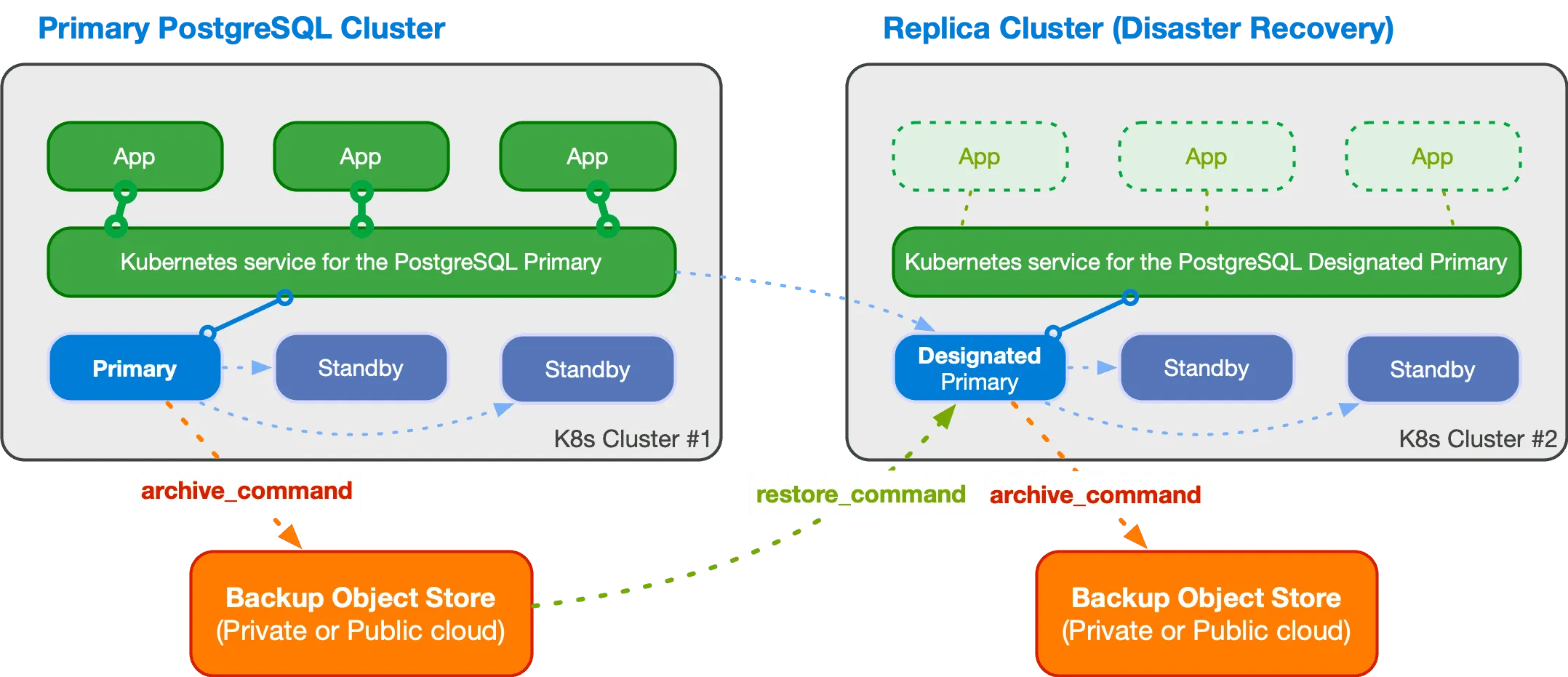
This is a PostgreSQL cluster that pulls data from object storage and thereby synchronizes with the primary cluster. This makes it possible to have a second “standby” cluster, for example in a different location.
Of course, such a cluster always has a delay of several seconds to minutes, depending on how often new WALs are generated on the primary cluster.
The new cluster has a so-called designated primary, which is the primary instance in the second cluster, and replication then proceeds in the standard PostgreSQL way. However, to switch the second cluster to become the main one, you must perform this switchover/failover manually. CNPG does not have a mechanism for making this change automatically. And considering solution stability, you might not want to do this automatically anyway.
If you want to learn more, check out the documentation.
kubectl Plugin
CNPG also has its own kubectl plugin that enables interaction with PostgreSQL
clusters.
It can be easily installed using kubectl krew (kubectl plugin manager):
kubectl krew install cnpgThen you can use kubectl cnpg:
kubectl cnpg status my-dbWith kubectl cnpg you can create backups whenever you want, change cluster settings,
monitor cluster status, and more. I definitely recommend the plugin – it’s a great
tool for managing PostgreSQL clusters.
PostgreSQL on Kubernetes: Your Own Managed Service
Thanks to CNPG, you can essentially run a PostgreSQL cluster on Kubernetes worry-free (at least that has been my experience at cybroslabs), as if it were a managed service from AWS, Azure, or Google Cloud.
The biggest problem for us was actually somewhat poor configuration that we had to fine-tune, but I write about that in the following section Things to Watch Out For.
Things to Watch Out For
Of course, as with any technology, there are things to watch out for with CNPG. From experience, there are specifically three: operator upgrades, timing of configuration changes and cluster health, and replica configuration.
Operator Upgrades
What’s important to know is that when the operator is upgraded, all PostgreSQL clusters are automatically restarted. If you have demanding applications that heavily use long-lived connections, an unplanned restart may not be ideal.
If you deploy pgBouncer alongside the cluster, it can help by handling the overhead of reconnection, but it can still impact latency, which may be a problem for real-time applications.
Cluster Changes Only When the Cluster Is Healthy
Another thing to watch out for is changing the cluster configuration, whether by
modifying the manifest or via kubectl cnpg.
If the cluster is not Healthy, no changes can be made. Under normal conditions this is merely inconvenient, as the operator typically completes changes within minutes and then you can work with the cluster again.
However, if the cluster is in a “broken” state, this becomes a problem. Keep in mind that once the cluster returns to a healthy state, it will immediately start applying changes that you wanted to make while the cluster was unhealthy.
Replica Configuration
The number of PostgreSQL instances is defined under spec.instances. One is always
the primary and the rest are replicas. Whether they are synchronous or asynchronous replicas
is configured under spec.minSyncReplicas and spec.maxSyncReplicas.
And here comes a bit of a “gotcha”. If you have instances=3,
minSyncReplicas=1 and maxSyncReplicas=1, everything is fine and you always have
at least one synchronous replica in the cluster, but also up to two.
However, if you set instances=3, minSyncReplicas=1 and maxSyncReplicas=2,
the cluster becomes unstable. So avoid this configuration.
More about replica configuration can be found in the documentation.
